mybyram: Medical Supply Orders
- 4.6
- Rating
- 100.00K
- Installs
- Free
- Price

 Analysis by App-foxy
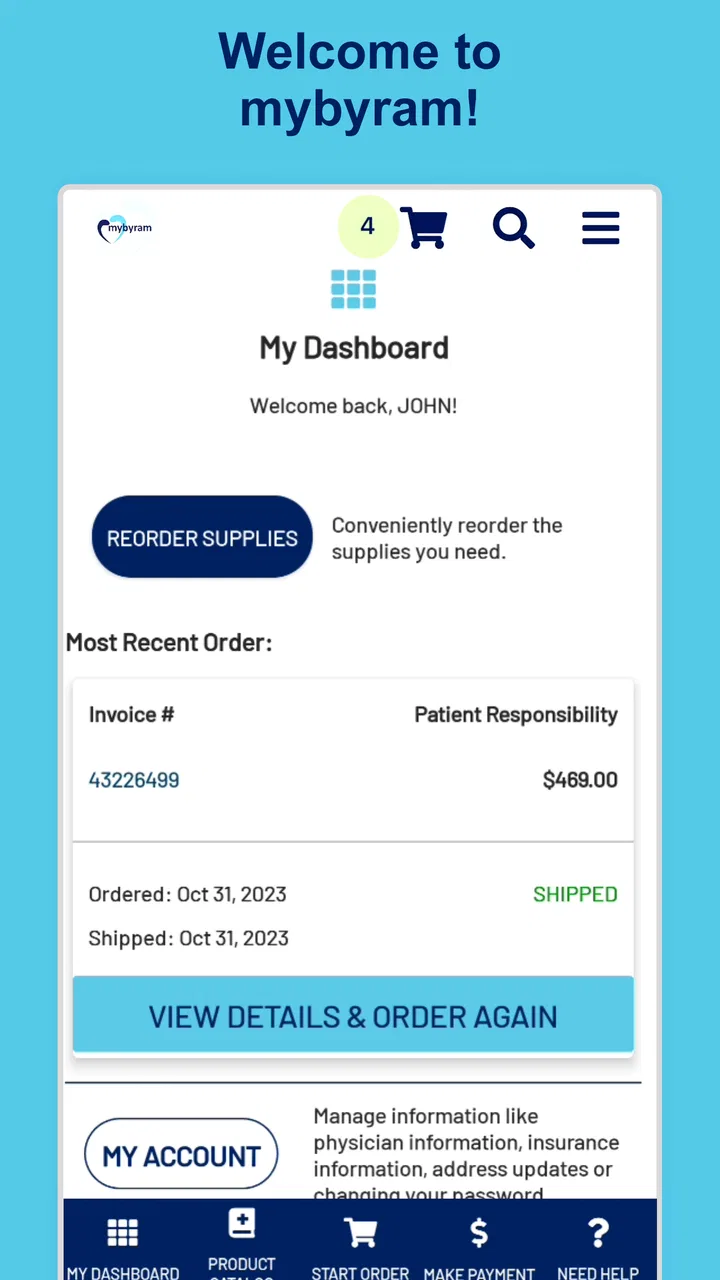
I approached mybyram: Medical Supply Orders as the kind of app people open when convenience matters, but reliability matters more. This free medical app from Accendra Health is built around access to a mybyram account and reordering medical supplies, so its value is practical rather than entertaining. It is meant to reduce the effort involved in repeating an order, especially when the alternative is searching through a website, calling during business hours, or trying to remember exactly what was purchased last time.
That narrow purpose is also the key to judging it fairly. I would not treat this as a general health-management tool, a symptom checker, or a replacement for professional medical advice. Its usefulness depends on whether your supply routine fits the account and ordering process it provides. For someone who already receives supplies through Byram, that focus can make the app feel refreshingly direct. For someone looking for broader medical records, appointment management, reminders, or education, it will feel limited from the start.
How clearly the app supports different users and situations
I look at this section through a practical question: does a focused reorder app fit the person’s routine, device, and level of support? The answer can differ for an independent user, a caregiver, or someone who needs help checking order details, so I’ll weigh those situations without treating convenience as the same thing as accessibility. That distinction also helps clarify when a phone-based reorder is useful and when another route may feel more dependable.
You May Also Like

 Blood Strike: 2.5 Anniversary
Blood Strike’s Loadouts Turn Every Drop Into a Tactical Gamble
A close look at Blood Strike’s custom loadouts: how fast access to signature weapons reshapes its battle royale rhythm, rewards preparation, and narrows the gap between fights.

 Pandora - Music & Podcasts
Pandora’s Music Is Easy to Start, but Harder to Recover
Pandora’s strength is its low-effort path from a seed to a station. Its weak spot is how much confidence it asks you to place in connection, setup, and quiet recovery.

 8 Ball Pool
 Is Built on Rivalries, Rematches, and Routine
A close look at the rivalries, rematches, shared routines, and unanswered safety questions that turn a quick pool match into a persistent mobile community.

 Samsung Music
’s Quiet Strength Is Playing What You Already Own
Its reach comes less from spectacle than from dependable access to a personal library. That simplicity is both the app’s strongest retention engine and its ceiling.

 AccuWeather: Weather Radar
AccuWeather Review: A Quick, Clear Forecast for Everyday Decisions
For everyday plans, the best forecast is the one you can understand quickly. AccuWeather makes rain timing, radar, and local conditions easy to act on, with a few trade-offs.

 Hill Climb Racing
Why Hill Climb Racing Still Turns Crashes Into One More Run
A tiny car, a bumpy hill and one more upgrade: Hill Climb Racing keeps resurfacing because its simple chaos makes every near-miss feel personal.
More From Our News Desk



Readability and navigation for repeat orders
The strongest design idea here is the reduction of a recurring task to a focused mobile workflow. A supply reorder is not something most people want to browse like a shopping catalog. They usually want to identify the account, find the relevant items, check what is needed, and submit the request without unnecessary detours. Keeping the app centered on those actions is more helpful than filling the screen with unrelated health content.
I also think this focused scope can support people who find large healthcare portals tiring to use. General medical websites often combine billing, messages, documents, appointments, prescriptions, and educational material in one navigation system. A dedicated ordering app has fewer reasons to make the user explore. That can lower cognitive load for a person managing diabetes supplies, continence products, ostomy items, or another recurring medical-supply routine, provided the account and ordering path are already familiar.
The practical test is whether the screen communicates what to do next without making the user interpret medical terminology unnecessarily. In this type of app, clear labels are more important than decorative design. A reorder button should feel like a continuation of an existing routine, not a new purchase decision. I would recommend opening the app once before an urgent need arises, while there is still time to learn where the account and reorder controls are located.
One useful habit is to treat the first successful order as a reference point. After using the app, note which supplies were easy to locate and which required more attention. The next reorder can then be prepared before supplies become critically low. This is not a special feature claim; it is a workflow advantage that comes from using a dedicated ordering channel instead of starting from scratch each time.
Text size and contrast can make a major difference in a medical context, particularly for people with low vision, fatigue, or temporary difficulty concentrating. I would judge the app by whether its labels remain understandable when the phone is held farther away and whether important actions are visually distinct from secondary information. Users who depend on enlarged system text should check the interface early, because an app may be functionally useful while still requiring more visual effort than expected.
The app has a broad Everyone content rating, which makes its intended audience open rather than restricted to adults. That does not mean every child can independently manage medical-supply orders. In practice, a parent, caregiver, or support person may still need to handle account details and final decisions. The rating describes content suitability, not independence or medical responsibility.
Motor and sensory considerations during a medical task
Reordering supplies can be difficult for reasons that have nothing to do with the product itself. Tremors, reduced dexterity, joint pain, limited reach, or fatigue can make small touch targets frustrating. A mobile app may be more convenient than a desktop site for someone who needs to order from bed or from a treatment area, but the same portability means the screen may be smaller and harder to operate accurately.
I would use the app in a stable position rather than holding the phone in one hand while trying to complete every step with the other. A stand, a larger phone, or assistance from a trusted caregiver can turn a fiddly process into a manageable one. The important trade-off is that convenience does not automatically equal accessibility: fewer steps help, but only if each step can be completed without precise tapping or prolonged visual attention.
People with sensory sensitivities may appreciate a focused ordering experience because it avoids the noise of a full retail marketplace. At the same time, medical-supply ordering can involve terms, quantities, and item distinctions that demand concentration. I would avoid placing an order while distracted, in a moving vehicle, or during a rushed transition between appointments. A quiet moment is safer than trying to complete the task in the few spare seconds before leaving home.
For users who rely on screen readers, voice control, switch access, magnification, or other assistive tools, the most important question is how the app behaves with the particular setup they use. I would not assume that a mobile interface supports every assistive technology equally well. If the order is time-sensitive, test the full path with the assistive method before depending on it. Having a caregiver or the usual phone-based ordering route available is sensible until that test is successful.
There is also a communication issue that is easy to overlook. If a user cannot comfortably inspect item names, quantities, or account information on a phone, the ability to reorder quickly may become a liability rather than a benefit. A fast confirmation is not useful if the wrong supply was selected. I would slow down at the review stage and, when possible, compare the order with the packaging or previous documentation before submitting it.
Situational access: where the app fits best
The clearest everyday scenario is a person noticing that a familiar supply is running low after returning from work or an appointment. Instead of locating a computer, finding the correct page, and rebuilding the order, they can use the phone already beside them to access the mybyram account and begin the reorder. That is a modest improvement, but recurring medical tasks benefit from modest improvements repeated over time.
The app may also suit people who travel between rooms, caregivers who coordinate supplies for a family member, or users who do not keep a computer in the same place where supplies are stored. A phone-based option is especially practical when the user wants to check the order while standing near the storage area. That makes it easier to compare what is physically left with what is being requested, rather than relying on memory.
Caregivers should think about privacy and responsibility before sharing access. A person helping with an order may be able to see account-related information, so the arrangement should be clear and deliberate. The app can support a shared routine, but it does not remove the need to decide who checks quantities, who submits the order, and who follows up if something goes wrong.
For users with unreliable internet access, a phone app is not automatically an offline solution. I would plan the reorder while connectivity is dependable and avoid waiting until the final supplies are nearly gone. This is one of the most important practical limitations of any account-based ordering workflow: the convenient moment to reorder may not be the same moment when the user has a stable connection, enough battery, or the energy to troubleshoot.
It is also worth separating a reorder from an urgent medical need. If a supply is missing, unusable, or required immediately, an app submission may not provide the reassurance of speaking with a person. In that situation, the usual customer-service or clinical contact may be more appropriate. The app is best understood as a routine ordering channel, not an emergency response tool.
Remaining barriers and trade-offs
The first barrier is eligibility in the practical sense: the app is useful only if the user has a mybyram account and obtains supplies through the associated service. Someone who buys medical products from a local pharmacy, another supplier, or a clinic-managed system will not gain much from installing it. This is not a criticism of the app’s focus, but it is an important reason not to recommend it universally.
The second barrier is scope. The store summary points to account access and reorders, and that narrow purpose means I would not choose it when I need a complete view of healthcare administration. People looking for lab results, medication reminders, appointment scheduling, symptom guidance, or direct clinical consultation should use the service designed for those needs instead. Adding unrelated functions would not necessarily improve this app; it could make the one useful task harder to find.
There is also a human-error risk. Reordering is convenient precisely because it repeats a previous pattern, but a previous pattern may no longer be correct. A changed prescription, altered usage, new insurance arrangement, or different supply requirement can make an old order unsuitable. I would never use the convenience of a reorder button as a reason to skip checking the item, quantity, and timing.
Account access can be another point of friction. Users who have difficulty typing, remembering credentials, recovering access, or switching between verification steps may find the app less independent than expected. This is where a caregiver-assisted routine can help, although it introduces privacy considerations. If account recovery becomes the main obstacle, the app’s simple purpose does not eliminate the need for support.
Version 1.5.2 is the current version, and the app requires Android 7.0 or later. That makes device compatibility a straightforward first check for Android users, particularly anyone keeping an older phone for accessibility reasons. A compatible operating system still does not guarantee that the interface will suit every device, display setting, or assistive setup, so I would test the actual phone rather than relying only on the version requirement.
Adoption gives the app some useful context: it has passed one hundred thousand installs and holds a 4.6 average from roughly fifteen thousand ratings, with about one and a half thousand written reviews. Those figures suggest that many people find the basic concept worthwhile, but they should not replace a personal accessibility test. A high average can reflect successful routine ordering for many users while still leaving a particular person struggling with text size, touch accuracy, or account access.
Who should use it, and who should choose another route?
I would recommend trying it first to an existing Byram customer who regularly reorders the same medical supplies and prefers using a phone. The strongest match is someone who values a short, repeatable process and can comfortably review account and order details on a mobile screen. It is also a reasonable option for a caregiver who has an agreed role in managing routine supply requests.
I would be more cautious for someone with severe low vision, significant motor limitations, cognitive fatigue, or a communication need that makes independent mobile ordering difficult. That person may still benefit from the app with assistance, but I would not promise that it will be easier than phone support or a desktop workflow. The best channel is the one that allows the user to verify details confidently, not simply the one with the fewest visible steps.
I would also skip it as a primary solution if the user needs urgent help, a new product rather than a repeat order, detailed clinical advice, or services beyond supply management. A general healthcare portal may be the better choice for someone who wants several types of health administration in one place. A direct conversation with a supplier or clinician may be better when the order has changed or the situation is medically complicated.
One of the app’s quieter strengths is that it can support consistency without pretending to manage the whole care process. I like that distinction. A focused tool can be easier to learn, easier to explain to a caregiver, and easier to fit into a weekly routine. Its weakness is the same: when the routine breaks, the app may no longer be enough on its own.
My inclusive verdict after weighing convenience against independence
mybyram: Medical Supply Orders makes sense as a practical companion for people who already use Byram and want a mobile way to repeat supply orders. I see its best value in reducing small administrative burdens: ordering from the room where supplies are stored, checking a familiar account without opening a full healthcare portal, and building a repeatable routine before stock becomes low.
My recommendation comes with a clear condition: treat accessibility as something to verify through actual use. Check whether text is comfortable, controls are manageable, account access is realistic, and the final review can be completed without rushing. If those pieces work, the app’s focused design can support more independence. If they do not, a caregiver, desktop browser, or human support channel may be more inclusive despite involving more steps.
Accendra Health’s app is free and intended for Everyone, while its medical category makes its purpose immediately clear. It was released on April 16, 2021, and the current Android version is 1.5.2. Those details matter less than the central question: does it make your existing supply routine safer and easier? For the right Byram customer, I think it can. For anyone outside that routine, or anyone needing broader healthcare support, I would choose a different tool rather than forcing this focused app to do a job it was not built to handle.
FAQs for mybyram: Medical Supply Orders
01What is myByram: Medical Supply Orders used for?
myByram is a mobile app designed for customers of Byram Healthcare to manage medical supply orders from a phone or tablet. Depending on your account and eligibility, you can browse covered products, reorder commonly used supplies, review order details, check shipment progress, and manage basic account information without needing to place every order by phone or through the website.
02Can I order any medical supply through the myByram app?
The products available in myByram depend on your prescription, insurance coverage, account type, and the supplies Byram Healthcare is authorized to provide. You may be able to reorder items such as diabetes, ostomy, urology, wound care, or other eligible medical products, but not every catalog item will be available to every user. Coverage and product availability should be confirmed before ordering.
03Do I need a Byram Healthcare account to use myByram?
Yes, you generally need an eligible Byram Healthcare customer account and valid sign-in credentials to use the ordering features. New users may need to complete registration and provide identifying or insurance information so the app can connect them with the correct account. If your login fails, your account is not recognized, or information appears incorrect, contacting Byram support is the safest solution.
04Can I track my medical supply order in myByram?
The app may provide order history, status updates, and shipping information for eligible purchases, allowing you to see whether an order is being processed, shipped, or delivered. Tracking details can vary depending on the product, fulfillment method, and carrier. Medical supplies can be time-sensitive, so review estimated delivery dates carefully and contact customer service if an order is delayed.
05Is myByram a replacement for medical advice or emergency care?
No. myByram is an ordering and account-management tool, not a medical consultation service. It should not be used to diagnose a condition, change treatment, or decide whether a product is medically appropriate. If you experience an emergency, contact local emergency services. For questions about prescriptions, usage, symptoms, or changes to your care plan, speak with a qualified healthcare professional.
Pros
- Conveniently reorder eligible medical supplies from your mobile device.
- Order history helps you quickly find and repeat previous purchases.
- Useful account tools for managing shipping and billing information.
- Can reduce the need for phone calls to place routine supply orders.
- Designed for Byram Healthcare customers and their supply needs.
Cons
- Availability may depend on your insurance plan and account eligibility.
- Some products may require additional documentation or approval before shipping.
- Delivery times can vary based on insurance processing and product availability.
- The app is mainly useful to existing Byram customers
- not general shoppers.
- Sensitive health and billing information requires careful account security management.

mybyram: Medical Supply Orders
Gallery